You know before
the tone drops.
Dispatch alerting that starts before dispatch does.
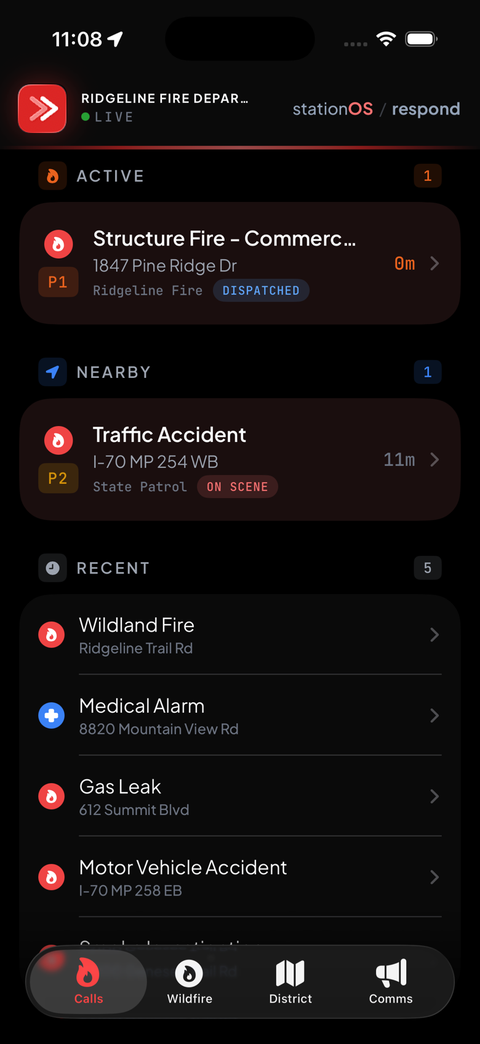
Your members get the call about twenty seconds before dispatch tones them out — then hear it announced, problem and address, on whatever screen they can actually reach.
Half the time you can’t get to your phone
It’s in your pants pocket, under your bunker gear, and you’re not getting at it. That’s the whole reason for the other six screens — the same live call on the wrist, the dash, the rig and the wall, never disagreeing about what’s happening.
iPhone & Android
The live call board, full incident detail with units and CAD notes, and one tap to respond with your destination and ETA already attached.
Apple Watch
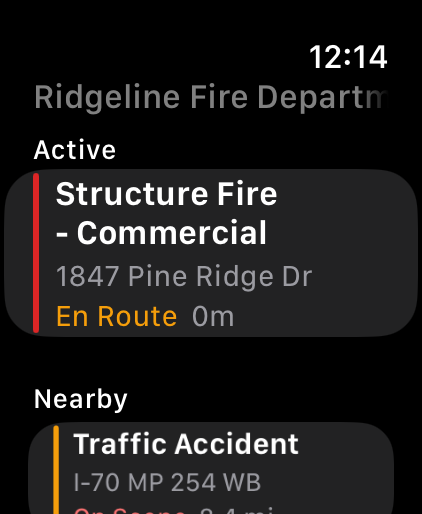
A haptic on the wrist the instant the page hits. Read the call, see who else is coming, and commit — without fighting your way into a pocket that is under two layers of gear.
Garmin Fenix & Instinct
Plenty of responders wear a Garmin instead of a smartwatch, and it’s the right call in the backcountry — rugged, workable with gloves on, and weeks of battery instead of a day. The call comes to the wrist and you can respond from it. It relays through your phone, so the phone still does the talking.
The car’s own screen
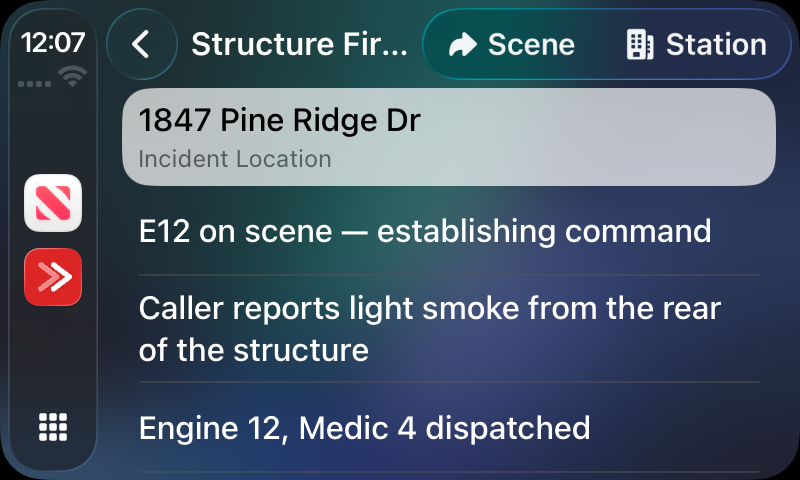
Not a call list you read at a stoplight. Tap once on CarPlay and you’re responding, with turn-by-turn already running to the scene or the station — and new CAD notes read aloud over the nav audio while you drive.
Your lock screen, the whole run
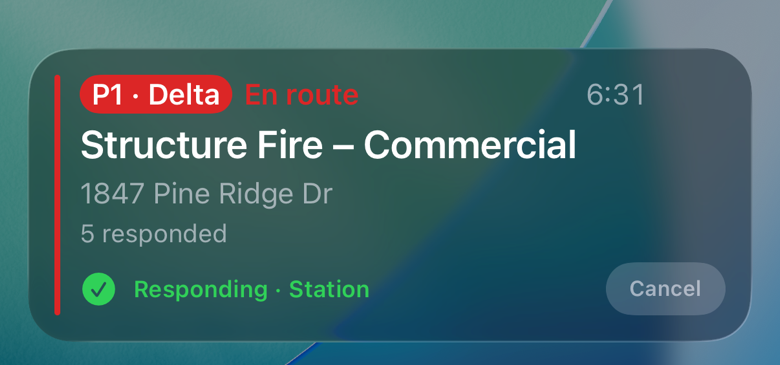
The same way your phone tracks a flight or a delivery, it tracks the call — priority, type, address, a running clock and how many are coming, sitting on the lock screen until it clears. No unlocking, no hunting for the app.
The tablet in the rig
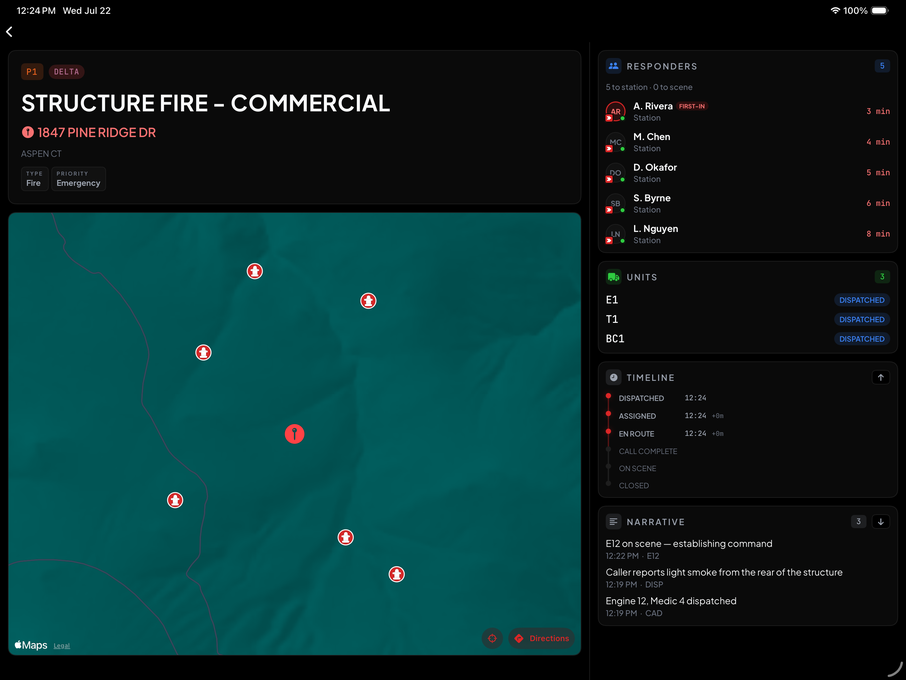
A rig-mounted app that signs in as the apparatus and stays signed in — deployable by MDM/Jamf, guided-access friendly. On dispatch it pulls up everything for that call automatically.
Station Wall Board
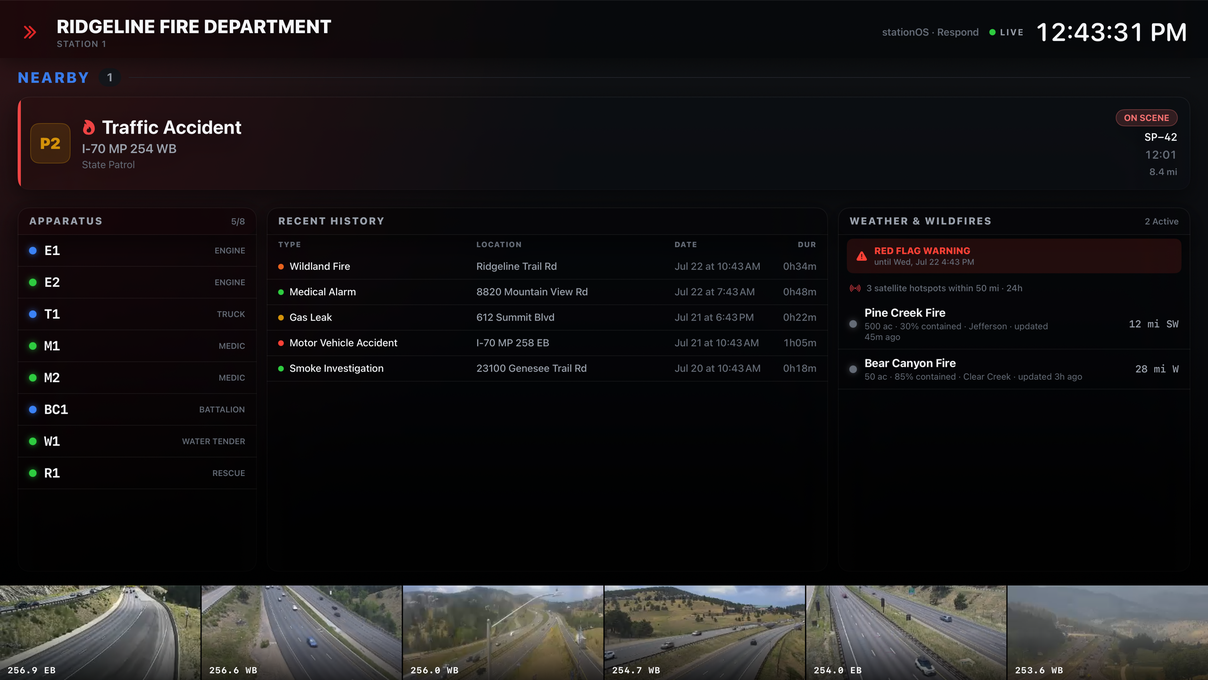
The screen on the apparatus floor: live calls, unit status, weather and wildfire conditions, and a full-screen incident command takeover when a call drops. Runs on a set-top box or a small computer behind any TV with an HDMI port — no control unit, no install, no screen to buy from us.
Respond in the wild
Turnout time starts before the tone
Most apps give you a ringtone when dispatch tones out. Respond stages it — a heads-up the moment a call lands in your district, the confirmed page when a unit of yours is attached — and announces both out loud, per member.
Pre-Alert
A call lands in your district before any unit of yours is attached to it. Across 29,000 calls in our dispatch center that gap runs a median of 20 seconds — against a median turnout of 67. Early information, so it’s opt-in per member, and most leave it on.
Dispatch
The confirmed page, fired when a unit carrying your paging prefix is attached. This is the one everybody gets — with the tone your department picks, from a library that already sounds like the gear you grew up on.
Spoken aloud
“Structure fire — 123 Main Street.” The dispatch is voiced on arrival, generated per call. You know what you’re going to before you’ve found your glasses.
One stage breaks through. On purpose.
Plenty of apps can override Do Not Disturb. The harder part is not doing it constantly. Only the confirmed dispatch gets that treatment — never the pre-alert, never a neighboring call — so when your phone ignores the mute switch, it means something.
Off duty means off duty
A master availability switch plus snooze (an hour, eight hours, or until you turn it back on) takes you out of the recipient list — no muting the whole phone and missing the next one.
Neighboring calls, if you want them
Your department already tracks its neighbors’ calls on the board. Members can opt in to alerts for those, rule by rule — off by default, and never critical.
Where the 20 seconds comes from: 29,459 calls through our dispatch center between January and September 2026, measuring the gap between a call reaching dispatch and the first paging unit being assigned — median 20 seconds, 47 at the 90th percentile. Median turnout across the same calls, from that assignment to a unit rolling, was 67 seconds. That is the window pre-alert makes available to a member; whether it turns into a faster turnout is up to whoever is putting their boots on.
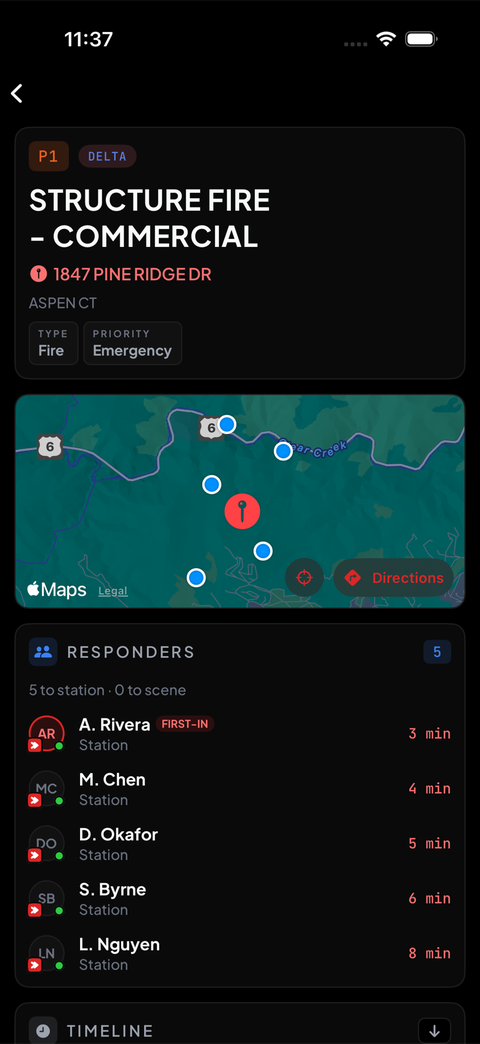
By the time your boots are on, there are three more people in the bay
So the question isn’t who got here first. It’s what’s still coming, and how far out — whether to take the utility now, or wait the ninety seconds for someone to roll the engine.
“Responding” on its own doesn’t answer that. The board splits everyone into three groups that add up — rolling, at station, on scene — each with a live drive time, so you can commit to a plan while you’re still getting dressed.
- Live positions on the incident map — every responder as a moving pin, not a static list of names
- ETAs from where you actually are — routed from where you actually are, not a guess and not your address. In district at the store still counts
- Rolling, at station, on scene — three groups that add up, worded the same on the phone, the watch, the car screen and the wall, so no two screens disagree about who is where
- Automatic arrival — a geofence at the destination marks you there and closes the tracking window, without a second tap
- Apparatus on the map too — rig-mounted devices report position, so the board shows units and people together
Your members are using their own phones
You turn location on once, and that’s the whole deal: from the moment you tap respond, Respond follows you until you arrive — or for twenty minutes, whichever comes first. Then it stops on its own. Not when someone remembers to switch it off, and not until the officer closes the call.
Between calls there’s no window open at all. A volunteer’s phone isn’t a fleet asset, and this isn’t a tracking app that happens to do dispatch.
Your radio runs the fireground.
Respond runs the drive to it.
No app fixes no signal. If your phone has nothing when the tone drops, you hear it on the radio like always — that’s what radios and pagers are for, and Respond doesn’t pretend otherwise. What it does is make sure you’re carrying the call before you lose signal.
You leave with the call already on the phone
The page doesn’t just wake the app. It pulls the whole incident down while you’re still on station wi‑fi or standing in your kitchen — type, priority, address, coordinates. Most apps wait until you open them, and if you open yours halfway up a canyon there’s nothing there.
Stamped when you tapped it
Responding, on-scene or cleared with no service queues on the phone — carrying the time you actually tapped, not the time it finally got through — and delivers in order the moment signal returns.
Honest status, never frozen
When a member goes dark, the board says “last seen 07:52” instead of leaving a stale ETA ticking. Nobody shows as “two minutes out” forever.
The information you’d otherwise be asking for over the radio
Caution & address notes
Dispatcher caution notes plus your own officers’ notes on an address — the gate code, the aggressive dog, the access quirk — surfaced automatically when a call comes in there.
CAD notes worth reading
Machine chatter — unit status lines, timestamps, codes — is filtered out on the glanceable surfaces, so what you see and hear is what a human actually typed.
When the call leaves the pavement
Gaia GPS and CalTopo for backcountry trails and forest roads, where a street navigator gives up and tells you to make a U‑turn. Apple Maps, Google Maps or Waze on the pavement. Coordinates anywhere in the CAD notes are tappable, so a lat/long from a caller is one tap from a route.
Calls you can read at a glance
Every call is classified — medical, fire, MVA, hazmat, rescue, alarm — from a taxonomy built against tens of thousands of real dispatches, so the district map reads instantly by color.
Hydrants on the map
Import the hydrant data you already keep and it draws on the incident map — flow, size and out-of-service status, available offline with the rest of the call. Import and display; we’re not pretending to run your flow testing.
The parts that aren’t table stakes
Native apps, push notifications, a map with pins, breaking through silent — every app in this category has those, and none of them is a reason to switch. These are the parts that took work.
Twenty seconds before the tone
Pre-alert fires the moment a call lands in your district, before a unit of yours is attached. Across 29,000 calls through our dispatch center that gap ran a median of twenty seconds — against a median turnout of sixty-seven.
It announces the call
“Structure fire — 1847 Pine Ridge Drive.” Problem and address, out loud, the way the six-figure box bolted to a station wall does it. The difference is this one was already in your bunker gear.
You leave with the call already on the phone
The page pulls the whole incident down while you still have wi‑fi. Open an app for the first time halfway up a canyon and there’s nothing to open — which is the part that bites, not the alert itself.
A tracking window that closes itself
Location runs from the moment you tap respond until you arrive, or twenty minutes, whichever is first. Then it stops on its own. Between calls nothing is open, because members are running this on their own phones.
Connected to the rest of the station
Respond stands alone, but with the full stationOS suite the same calls flow into your NERIS reports and turnout feeds your personnel records. Nobody re-keys what already happened.
Written by someone still on the roster
Every competitor here can point at a firefighter who used to run calls. Respond was written by a lieutenant who is on the schedule this week — after nearly throwing his phone out of the engine over an app that couldn’t map a call properly.
Get Respond in your members’ hands
Available on its own, or as part of the full stationOS suite. Departments are running it today, with the public App Store release landing shortly.